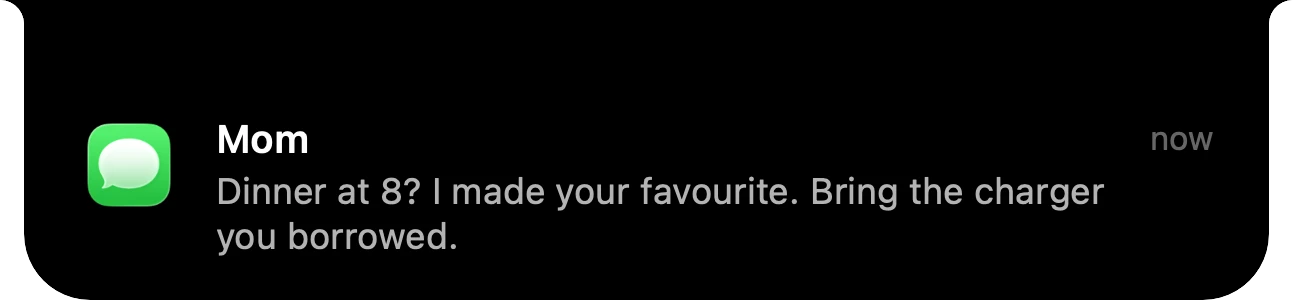
Notifications, in the notch. Messages from any app arrive right where you're already looking.
Halo 2.0 is here: notifications, dictation and Buddy, right in your notch. Buy now
New in 2.0: your messages, your voice and a little Buddy, right in the notch
Your messages. Your voice. A little Buddy.
All in the notch.
$9.99 one-time. No subscription.
macOS 15 or later. Apple silicon and Intel.

That's Halo, up there. Hover it.
Notifications, in the notch. Messages from any app arrive right where you're already looking.

Hold Fn. Just talk. Your words are typed wherever your cursor is, in any app.

Meet Buddy. A little face that follows your cursor and naps when you step away.

On a call? See which app has your mic, and for how long.

Your AI agents, live. Know the moment Claude Code or Codex needs you.
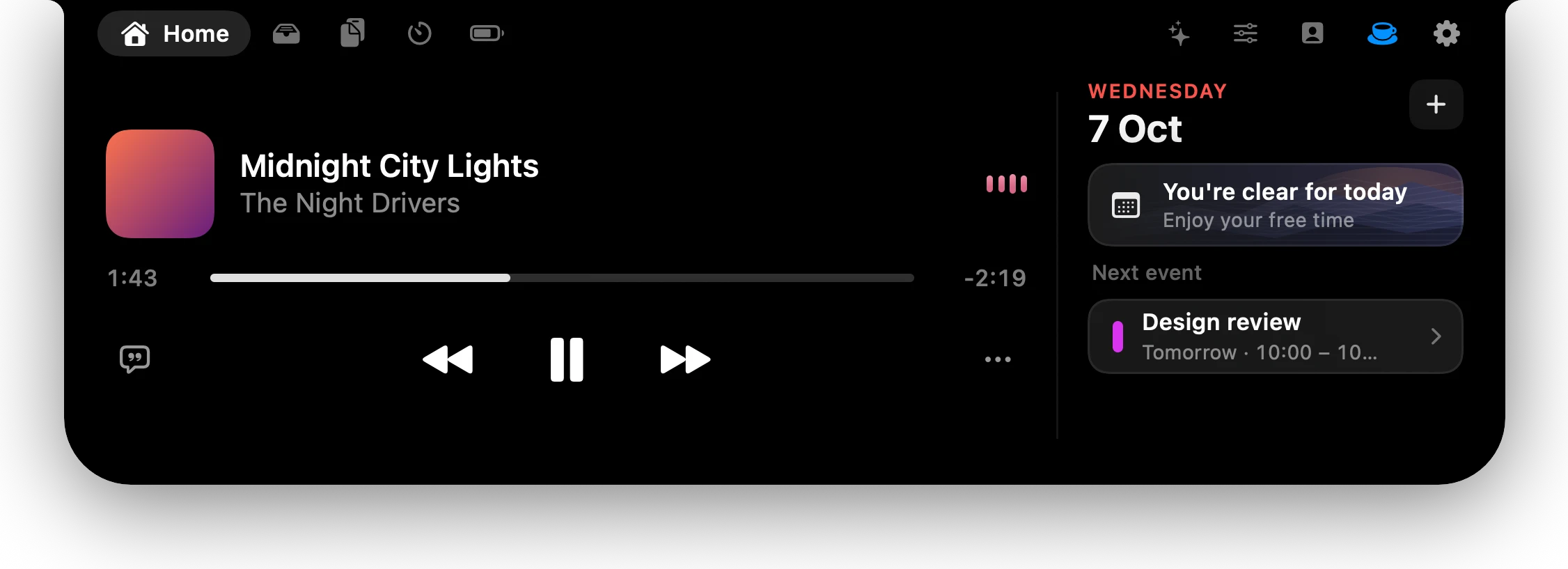
Now Playing, redesigned. Artwork, a scrubber and your day, a hover away.
Notifications
Messages, Slack, Mail, Telegram: banners from any app arrive in the island instead of the corner of your screen. Read it at a glance, click to open the app, or let it slip away.
A click takes you straight to the conversation.
Turn the notch on or off for each app in Settings.
The usual macOS banner steps aside while Halo shows it.
Dictation
Hold the key and say what you want to write. Your words show up under the notch as you speak, and when you let go, they land wherever the cursor is: a message, an email, a terminal. Use Fn, the right Option or Command key, or any shortcut you like.

Free, with Apple's speech recognition on your Mac. Or add your own Groq key for Whisper and dozens more languages.
Halo Buddy
A little face that lives beside your notch. It follows your cursor, smiles when you come by and naps when you step away. And it wears your agents' mood: thinking while they work, wide-eyed when they need you, happy when they're done.
 Calm
Calm Happy to see you
 Listening
 Thinking
 Needs you
 Done
Done Napping
 Something broke
Banners from any app, in the island. Click one to open it.
Choose which apps can reach the notch.
Hold Fn, talk, let go. The words land where your cursor is.
Fn, the right Option or Command key, or any shortcut.
Prefer Groq's Whisper? Add your key. It stays in your Keychain.
A face in your notch that follows your cursor and naps when you're away.
Thinking, needs you, done or stuck, at a glance.
FaceTime, Zoom, Teams, Slack, Discord, Telegram, WhatsApp or Meet: who has your mic, and for how long.
Settings, Hide and Quit, one click away.
English, Spanish, German, French, Italian, Portuguese, Russian and Uzbek, with a switcher in Settings.
Now Playing, redesigned after the one on your iPhone.
Claude Code and Codex limits as rings, in the island and the notch.
Setup in four short steps, with a try-it-now moment.
Finder's colours, with a face on the notch.
New springs, faster tabs and nothing overlapping as you switch.
Built for AI agents
Working, waiting for your permission, done or stuck: Claude Code and Codex, live in the notch. A soft sound when one needs you.
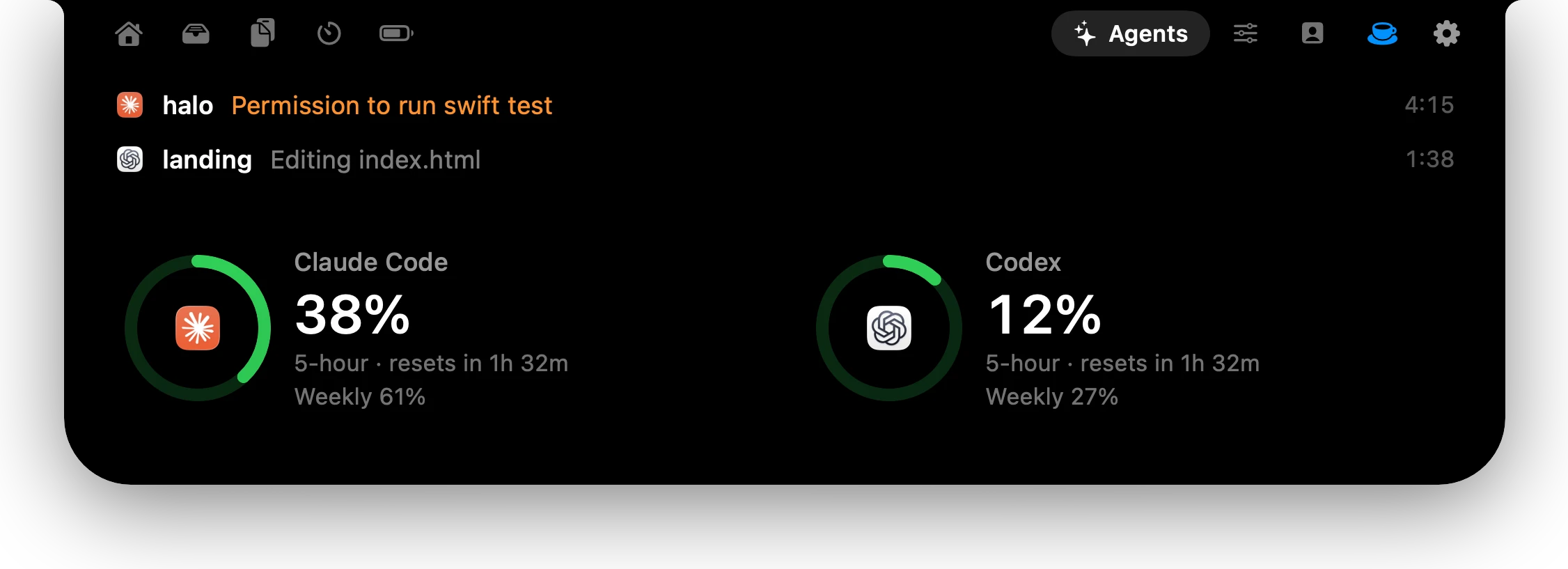
The Agents tab lists each session with what it's doing, above your usage rings. Click one to jump to its terminal.

Thinking while an agent works, wide-eyed when it needs you, all smiles when it's done.
Halo is a Dynamic Island for your Mac. It turns the notch, or the top of any screen without one, into a live home for your messages, your voice, your AI agents, your music, your day and your files. It stays out of sight until something happens. And on an external monitor, the brightness keys finally work.
One island
Everything you need.
Nothing in the way.






Lock Screen
Play, pause, skip, or drag to any second, without unlocking. The card sits just above your picture, sized for every screen from a MacBook to an ultrawide.
Go on, drag the bar.
Off until you turn it on in Settings. Beta.
External monitors
macOS shows a HUD and changes nothing. Halo grows a notch on screens that have none, and its keys set the monitor's real backlight over DDC/CI,2 plus contrast and input switching from the island.
Press them, or use ← →.
Halo runs on your Mac and keeps to itself. No account to make, nothing to sign in to, nothing personal sent.
Download it, open it, done.
Your notifications and agents are read on your Mac and never leave it. If you allow it, Halo sends anonymous usage counts once a day.
Update checks and usage counts, only if you allow them. Lyrics lookups send just the song's title and artist. Dictation stays on your Mac, unless you add your own Groq key.
No. On screens without one — external monitors, older Macs — Halo draws a slim island at the top, or on the left or right edge if you prefer.
Yes. It covers the same ground (now playing, volume and brightness, a file shelf) and adds control of your external monitor: brightness, contrast and input switching over DDC/CI. It also runs on screens that have no notch.
macOS 15 Sequoia or later, on Apple silicon and Intel. Controlling an external monitor's brightness, contrast and input needs Apple silicon.
Nothing personal. The app has no account. It connects to the internet for five things: checking for updates, only if you allow it; looking up lyrics for the playing song on LRCLIB (title and artist only; turn Lyrics off in Settings and it never does); sending what you dictate to Groq to turn it into text, only if you choose Groq for dictation and add your own key; activating your license key with Lemon Squeezy, once, when you enter it (the key and your Mac's name); and, if you leave “Share anonymous usage” on, sending usage to Umami: once a day, which features are on, how often the island opens and which tabs you use, plus a note when your trial starts, ends or you activate a key. That comes with a random ID and the app version, never your name, email, license key, files or what you listen to. Agent status reads Claude Code's and Codex's activity from files on your Mac, and notifications are read on your Mac; neither ever leaves it. Apple's dictation runs on your Mac once macOS has downloaded your language; until then Apple processes it on its servers. Turn it off any time in Settings › General. This website counts visits with Umami, which uses no cookies and doesn't identify you.
For now, yes — Halo isn't notarized by Apple yet. The first time, open Halo, then go to System Settings → Privacy & Security and click Open Anyway. You only do this once.
Yes. Download Halo and use everything free for 3 days, with no account and no card. When the trial ends, buy Halo and paste the license key from your purchase email. One key works on up to 3 Macs.
No. While Halo shows a banner in the notch, the usual macOS banner steps aside. It's still in Notification Center afterwards.
Yes. It uses Apple's speech recognition, on your Mac once macOS has downloaded your language. If you prefer Whisper, add your own Groq key; Groq bills you directly, and Halo never sees the key outside your Keychain.
English, Spanish, German, French, Italian, Portuguese (Brazil), Russian and Uzbek. Halo follows your Mac's language, or pick one in Settings › General.
No. You pay once: $9.99.
No. The island hides itself in fullscreen video and games, and stays out of the menu bar's way.

Halo
A living island for every Mac screen.
$9.99
BuyOne-time purchase. macOS 15 or later. Apple silicon and Intel.